Disaster Recovery Plan - Business Continuity Plan Template
ISO 27000 ( formerly ISO 17799 ) - Sarbanes-Oxley - HIPAA - PCI-DSS Compliant



Data center and information systems infrastructure are the backbone enabler's of most companies’ critical business processes. When organizations experience a major disaster or disruption, ensuring operational continuity for critical business processes requires that IT and electronic data be recovered in a timely manner.
The IT Disaster Recovery Business Continuity Template delivers a proven solution designed to protect and, if necessary, relocate critical information systems to alternate data center facilities. The Disaster Recovery Business Continuity Template does this by employing a comprehensive strategic and tactical planning approach that aligns recovery solutions with key business requirements and tolerances for disruption. The Disaster Recovery Business Continuity Template also delivers an actionable recovery plans that will direct your staff to respond to events beginning from the point of an initial data center disruption through alternate site relocation, operational recovery and return to your home facilities.
The Disaster Recovery Business Continuity Template has helped hundreds of organizations across a broad spectrum of industries in the creation of actionable Disaster Recovery and Business Continuity plan. 
This Disaster Recovery Plan (DRP) can be used as a Disaster Planning template for any enterprise. The Disaster Recovery template and supporting material have been updated to be Sarbanes-Oxley and HIPAA compliant. The Disaster Planning Template comes as a Word document and includes:
- Disaster Recovery Plan and Business Continuity Template
- Business and IT Impact Analysis Questionnaire
- Work Plan
- Disaster Planning Audit Program
- Incident (Media) Communication Plan/Policy
Features include:
 Compliance with ISO 27000 ( ISO 27001, ISO 27002, and ISO 27031), Sarbanes-Oxley and HIPAA standards
 - Web Site Disaster Recovery Planning Form
- Department Disaster Recovery Activation Workbook
- Quick Reference Guide
- Team Alert List (Form)
- DRP Team Responsibilities
- DRP Team Checklist
- Critical Function(s) Definition
- Normal Business Hour Response Procedures
- After Hours Response Procedures
- DRP Location(s) Definition
- DRP Recovery Procedures
- Notification Procedures
- Notification Call List (Form)
- Updated Business and IT Impact Analysis Questionnaire
- Vendor Disaster Recovery Questionnaire
- Vendor Phone List Form Updated
- Key Customer Notification Form
- Critical Resources to be Retrieved Form
- Business Continuity Off-Site Materials Form
- Chief Information Officer
- Chief Security Officer
- Chief Compliance Officer
- VP Strategy and Architecture
- Director Disaster Recovery and Business Continuity
- Director e-Commerce
- Director Media Communications
- Manager Disaster Recovery
- Manager Disaster Recovery and Business ContinuityDisaster Recovery Coordinator
- Disaster Recovery - Special Projects Supervisor
- Manager Database
- Capacity Planning Supervisor
- Manager Media Library Support
- Manager Site Management; and
- Pandemic Coordinator
The DRP template is over 200 pages and includes everything needed to customize the Disaster Recovery Plan to fit your specific requirement. The electronic document includes proven written text and examples for the following major sections of a disaster recovery plan:
- Plan Introduction
- Business Impact Analysis - including a sample impact matrix
- DRP Organization Responsibilities pre and post disaster - drp checklist
- Backup Strategy for Data Centers, Departmental File Servers, Wireless Network servers, Data at Outsourced Sites, Desktops (In office and "at home"), Laptops and PDA's.
- Recovery Strategy including approach, escalation plan process and decision points
- Disaster Recovery Procedures in a check list format
- Plan Administration Process
- Technical Appendix including definition of necessary phone numbers and contact points
- Job Description for Disaster Recovery Manager (3 pages long) - entire disaster recovery team job descriptions are available.
- Work Plan to modify and implement the template. Included is a list of deliverables for each task. (Risk Assessment and Vulnerability Assessment)
- Disaster Recovery Manager Responsibilities
- Distribution of the Disaster Recovery Plan
- Maintenance of the Business Impact Analysis
- Training of the Disaster Recovery Team
- Testing of the Disaster Recovery Plan
- Evaluation of the Disaster Recovery Plan Tests
- Maintenance of the Disaster Recovery Plan
Click on the link below to get the DRP/BC sample pages now and make it a part of your disaster recovery toolkit.
Testimonial - Dave Baker - City of Hamilton - I have found the DRP template invaluable!
Testimonial - Bob Rifenbury -MCSE/CCNA Launch Testing Lab - The DRP Template saved me about 6 months of work!
Testimonial - Kelly Keeler - Martin's Point Health Care - I have received and I began using the template immediately. IT IS GREAT! Made this process a snap for me. Cut my documentation time down from. weeks to hours! This document has made, what began to be an overwhelming process turn into a snap!
Testimonial - Juan Stamos - Mexico City Corporation - We had a DRP in place, but needed a more user friendly structure. The Disaster Recovery Template (Gold edition) has that structure. It was very easy to quickly move our DRP into Janco's DRP Template -- a real added value.
* Update service is for 12 months unless it is purchased within 30 days of the purchase of the Template. Janco reserves the right to validate purchase of the customer was made for the template.
This template is not for resale or re-distribution - Disaster Recovery Planning Template Disaster Recovery Guide
Disaster Recovery Business Continuity News
IT Infrastructure Archieture
Business leaders now understand that digital is central to their business and success. They are grasping that fact that their customers, products, and competitors are now fundamentally digital. Their operations and insights are digital. Digital business promises to usher in an unprecedented convergence of people, business, and things that disrupts existing business models. While 74% of business executives say their company has a digital strategy, only 15% believe that their company has the skills and capabilities to execute on that strategy. A piecemeal strategy of bolting on digital channels or methods is no longer sufficient.
Enterprise IT Infrastructure Architecture Framework
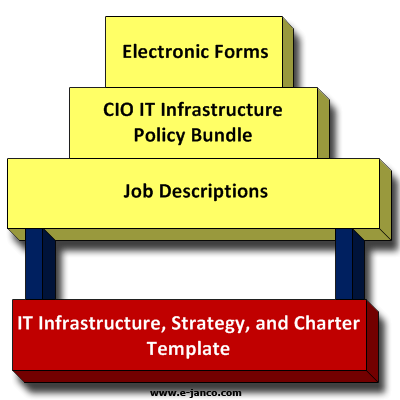
The foundation of Janco framework is its IT Infrastructure, Strategy, and Charter which provides the overall structure
- more info
RTO and SRO defined
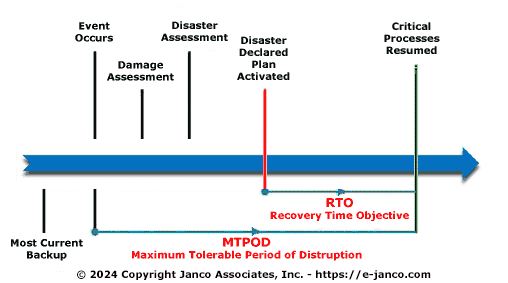
RTO is the maximum length of time a process can go without being performed before there are unacceptable operational, financial, or regulatory impacts (et al). A service recovery objective is how soon the business continuity or disaster recovery plan must be implemented in order to fulfill the RTO (management defined recovery objectives). For example, if a call center has a 96 hour RTO, but it will take at least 24 hours to implement the recovery plan, then the SRO is 72 hours. Other organizations may have a different perspective on the term. I'm guessing you can frame the relationship between an RTO and SRO mathematically as X+SRO=RTO where "X" indicates the zero (origin) point of the disruption to operations, SRO indicates the time needed to implement the recovery procedures, and RTO indicates the management defined recovery objective.
- more info
Recent DR study raises a number of concerns
The results of a recent study indicate an urgent need for organizations to make significant improvements to their backup strategies with one in five organizations experiencing back-up failures at least monthly and one in 10 weekly. As a result, 53 percent of organizations plan to make changes to their backup strategy this year. Incorporating cloud storage was the remedy most often cited by these respondents.

Disaster recovery was the area where backup strategies were most under stress:
- 12 percent of respondents predict that they can recover from a site disaster within a couple hours. Cloud storage users were twice as likely to recover in that timeframe (20 percent) as non-cloud storage users (9 percent).
- 63 percent of organizations measure site recovery time in days, with 29 percent requiring four days or more.
- More than half of organizations experience backup failure multiple times a year due to a host of issues from connectivity failure (25 percent), equipment failure (21 percent) or file corruption (18 percent).
As organizations try to minimize the resource commitment required by their backup strategies, the survey found the results on management and maintenance standards alarming. Specifically the report found:
- more info
- 75 percent of respondents are backing up more data than they did last year, and 21 percent are backing up at least twice the data as last year. Only three percent report backing up less data.
- 59 percent of organizations keep backups in only one location, typically a single, physical site.
- Individual applications were at greatest risk, with nearly a quarter of organizations backing up applications less often than monthly and, in some cases never.
What level of changes do CIOs expect to see in the way thier organization manage business continuity
Only 16.8% expect no changes in infrastructure and organizational business continuity in 2014.
Almost half (49.6%) expect to see small changes; and a third (33.6%) anticipate large changes in the way their organization manages business continuity.
CIOs expecting to see changes were asked to provide details of the one area that is likely to have the biggest impact on business continuity practices or strategies within their organization. The key trends were:
- 10.3% expect to see a significant increase in testing and/or exercising activities;
- 9.3% will be making major revisions to BCM strategies and/or BCP(s);
- 8.2% will embark on new ISO 22301 alignment, implementation and certification projects;
- 8.2% will be taking a more holistic approach to BCM;
- 6.2% expect Changes in the business / organizational structure;
- 5.2% will be making improvements in incident management processes;
- 4.1% think there will be an increased focus on supply chain resilience / supply chain dependencies;
- 4.1% will be taking a new approach to BIAs or will be making a complete reassessment.
- more info
Trends in Business Continuity according to Continuity Central
Trends that are emerging in terms of the changes that business continuity professionals expect to see include:
- 10 percent are anticipating changes in incident / crisis management processes;
- 8 percent expect to see greater integration with the wider business;
- 5 percent expect ISO 22301 implementation projects to drive change in 2014.
Business continuity budgets
The majority (53 percent) of respondents state that their 2014 spending will be the same as 2013. However more than a third say that their business continuity budgets will be increased: 22 percent state that spending will be higher in 2014 compared to 2013; and 15 percent state that it will be much higher.
Recruitment
Three quarters (77 percent) of respondents believe that their organizations business continuity team will remain the same size in 2014. However a fifth (21 percent) expect the team to grow with new additions being made. Only 2.5 percent of respondents expect their business continuity team to shrink.
- more info